In 2026, when you join a new team, you onboard with your Agent.
Two months ago, I joined Claap (an AI company, recently acquired by Lemlist) as a Senior Software Engineer, leading on AI. I hadn’t joined a new team in years. I’d been building my own. No shared CLAUDE.md waiting for me, no pre-configured skills. Just a blank slate.
My agent and I had to learn the conventions together: architecture patterns, naming rules, tooling quirks, all of it.
The Golden Rule: You adapt to the project; the project does not adapt to you. The same goes for your Agent’s code.
Here’s how I bootstrapped my Claude Code (CC) config from zero, without writing a single line of Markdown myself.
Spoiler: after a few weeks, CC now produces code that matches the project conventions! 🎉
Starting from nowhere

In the beginning, my context was empty. I adopted a specific workflow to extract the team’s implicit knowledge:
1. The Quick-Start: Let the Agent Explore
Good news: this step is easy. Just use /init (the official CC command) and you’re set. It bootstraps a CLAUDE.md after exploring the project.
Reddit still debates whether it’s worth it, but the consensus is: yes, it works.
But this won’t catch everything. Some patterns are legacy, others too subtle. The real conventions are often revealed in discussions, code reviews, and discoveries along the way.
At this point, ask a colleague to quickly review the generated notes: you’ll have a solid starting point. Just make sure CC isn’t too verbose; you don’t need the entire file tree listed there.
2. The regular “How do we usually do this?” Question
Instead of assuming, I constantly asked:
Is this a common pattern in this project?
or
How do we usually handle this kind of thing?
(I like this one a lot)
CC scans the repo, finds the pattern, and proposes a matching solution. Perfect time to note something!
3. Delegate config writing
I never edit config files manually. AIs write better English than me, and much faster. (Don’t worry, this article reflects exactly what I think; these aren’t empty words generated by an AI.)
So I let CC write its own instructions based on my input. I just make sure I agree with every single line: because these are rules. Keep in mind this isn’t marketing copy nobody reads. Your Agent will read this config and try to follow it.
When I identify a convention, I tell my agent:
Add this to your configuration rules.
Most of the time, it formats the instruction perfectly for itself.

Code Reviews
Code reviews are the perfect time to adjust your instructions. Context matters here: if a random dev suggests a change, it’s a suggestion. If the Lead Architect suggests a change, it’s likely a requirement.
So I explicitly told Claude who’s who on the team:
Bob is the Lead. He decides on architectural choices and conventions. His opinion carries more weight on structural decisions.
Since we are a very small team (< 10 people), I do this simply. But for larger organizations, you could easily build a “People Skill”: a tool that triggers when a colleague is mentioned, retrieves their role, and treats their input with the appropriate context.
If you treat the Agent as a team member, like anyone else on the team, it needs to know the org chart.
Optimization Hacks
Sometimes a rule you thought was clear just isn’t followed. You’ve probably seen lots of “IMPORTANT” scattered across agent configs (a hint the developer gave up somewhere). Often, the issue is simply a lack of boundaries: not enough guidance for the LLM to know exactly how or when to apply a rule.
The “Post-Mortem” Prompt
This is my favorite fix. When Claude messes up, I don’t just fix the code. I fix it at the source by saying something like this:
I expected you to know this. I want you to modify the skill description so that, in a future conversation, you would have applied this without me specifically asking you to.
The “Auto-Improve” Meta-Skill
What if the Agent could identify conventions by itself?
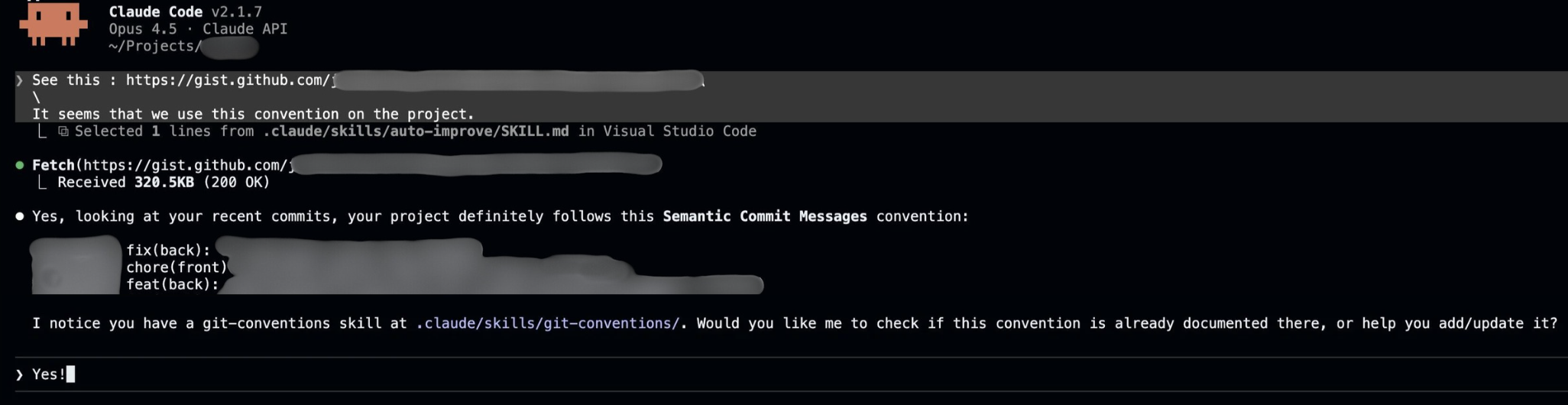
After a few weeks, it drove me crazy that I still had to say “note this” manually every single time. CC should learn by itself.
So I created the final piece of the puzzle: what I call a Meta-Skill (my own term, call it whatever you like). It is essentially a “Memory-Skill” designed to let Claude Code upgrade itself.
Here’s the key: Skills can be triggered via semantic matching: a .md file (instructions) loaded dynamically based on conversation context. The agent only sees the skill’s title and description, which is exactly where you add your “trigger” phrases.
Disclaimer: this won’t work magically every time, and it might not trigger exactly when you expect. But most of the time, if instructions are well, it works.
My Meta-Skill is triggered by phrases like:
- “We usually do this like…”
- “The convention is…”
- “Update your knowledge about…”
When I drop one of these cues during a code review or a fix, the Meta-Skill wakes up. It parses the new convention, determines where it belongs (Architecture rule? Testing nuance? CLI parameter?), and physically updates the CLAUDE.md or skill definitions.
Here’s a lightweight version of my Meta-Skill:
---
name: auto-improve
description: >
  Capture coding conventions and team standards into config files.
  Triggers on: "our convention is", "we always", "we never", "from now on",
  "we prefer X over Y", "remember this", "I was told in review".
---

# Auto-Improve: Capture Conventions

When triggered, persist new conventions into the appropriate location.

## Where to put it?

| Scope                  | Location    |
| ---------------------- | ----------- |
| Applies to ALL code    | `CLAUDE.md` |
| Specific workflow/task | Skill file  |

## Behavior

1. **Filter**: Is this actually a convention worth noting? If unsure, ask.
2. **Acknowledge** briefly: `📝 Noted: "{convention}" → adding to {location}`
3. **Continue** with current task (persist in background)
4. **Keep it concise**: one-liners when possible

## Example

**User:** "In review I was told we should always use early returns"

**Agent:**

1. Confirms it's a real convention (code style rule)
2. Scope: applies everywhere → `CLAUDE.md`
3. Ack: `📝 Noted: "prefer early returns" → adding to CLAUDE.md`
4. Continues working, persists in background
Final Word
That’s how I got a working Claude Code configuration in just a few weeks, starting from zero.
Setting up a coding agent is like paying off technical debt: don’t try to do it all upfront, do it along the way, as you ship. Start with /init, iterate, and when a convention comes up, ask CC to update its own config right there in the conversation.
One more thing: if doing this mid-session feels noisy, you can always /fork, update the config, and resume the original conversation. Easy.